

Technical teams building AI agents on B2B data often face the same challenge. They want to describe their data needs in plain language and receive structured results, without building or maintaining a separate layer to translate prompts into database queries. B2B data MCP servers now address this need directly.
In this guide, you will learn how B2B MCP servers work, what to consider before connecting one to an agent, and how five leading servers compare: Coresignal, Crustdata, Explorium, Crunchbase, and ZoomInfo.
What is an MCP server?
MCP servers are programs that expose specific capabilities to AI applications through standardized protocol interfaces.
An MCP server connects AI applications to an external system through the Model Context Protocol. It tells the AI client which tools are available, runs those tools when the agent calls them, and returns structured results the model can read. For B2B data, the external system is a provider’s database of companies, professionals, and job postings.
How B2B MCP servers work and how they differ
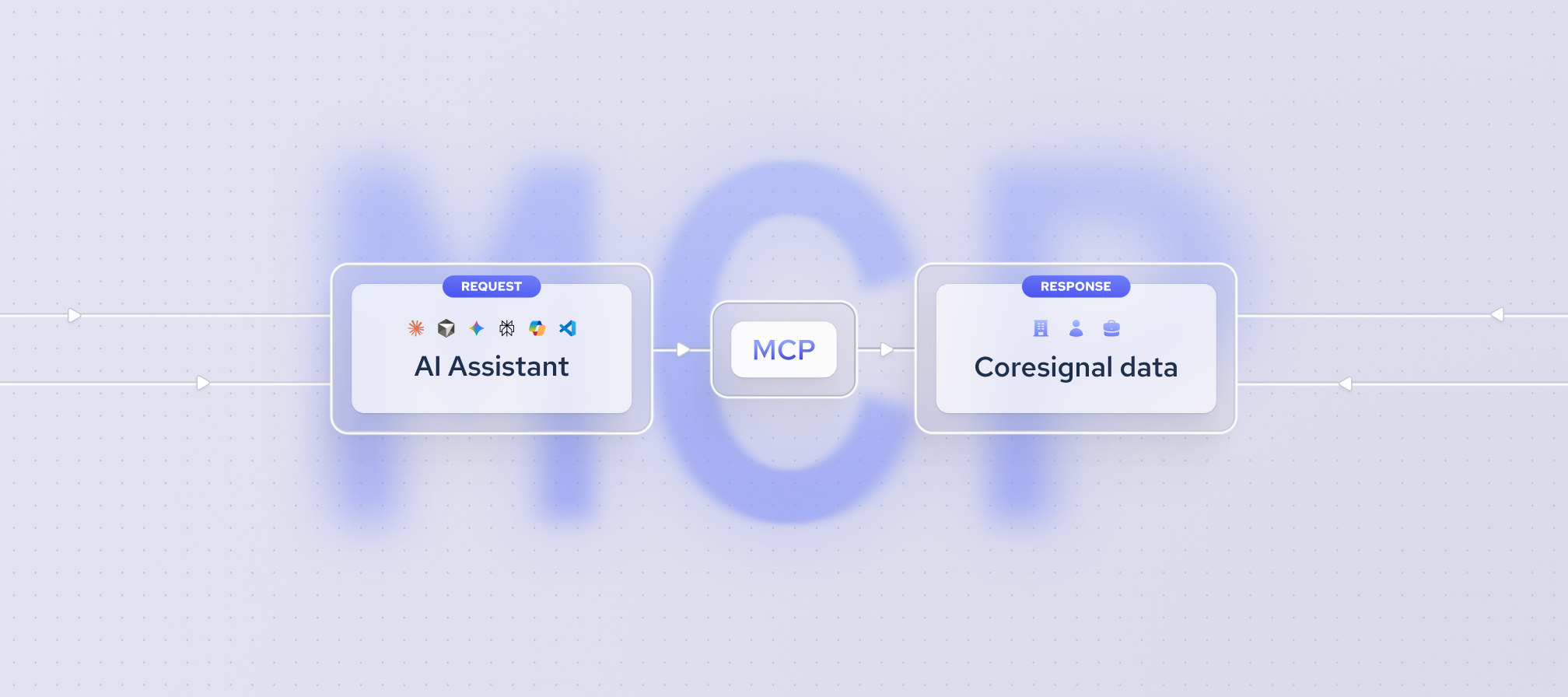
Here is how a request moves between AI clients and MCPs:
- You add the data provider’s MCP server to your AI client (Claude, Cursor, Codex, etc.), and the client connects to it.
- The AI client asks the MCP server which tools it offers and gets the list back.
- When a task needs data, the agent picks the right tool and uses it. For example, if you ask “Find marketing directors at U.S. software companies”, it uses the search tool.
- The MCP server runs the request against the provider’s data and sends the results back to the AI client.
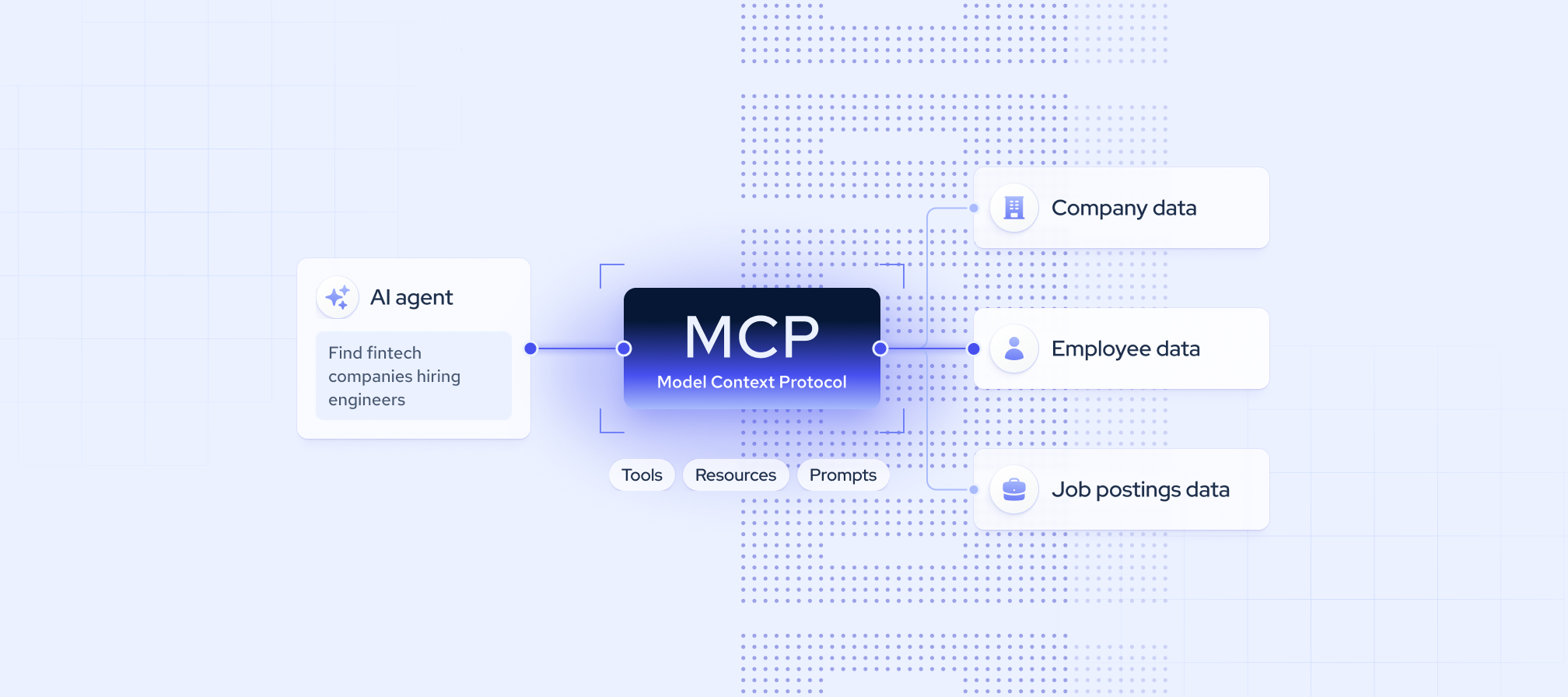
A B2B data MCP server is a Model Context Protocol endpoint that gives AI assistants like Claude direct access to company and people data as callable tools. B2B MCP for AI allows an AI assistant to natively search, enrich, and query vast business data pools using natural language prompts.The tools usually fall into three groups:
- Search: find companies, employees, or jobs that match given criteria.
- Enrichment: get the full record for a company or profile you already know.
- Field discovery: see which data points exist before you build a query.
The Coresignal MCP documentation shows this split, with separate tools for natural-language search, field discovery, full profile pulls, and email enrichment. If you are planning on using B2B data for AI agents, these three tool groups are a good starting point.
Beyond this shared flow, servers differ in four ways.
1. Remote vs. local servers
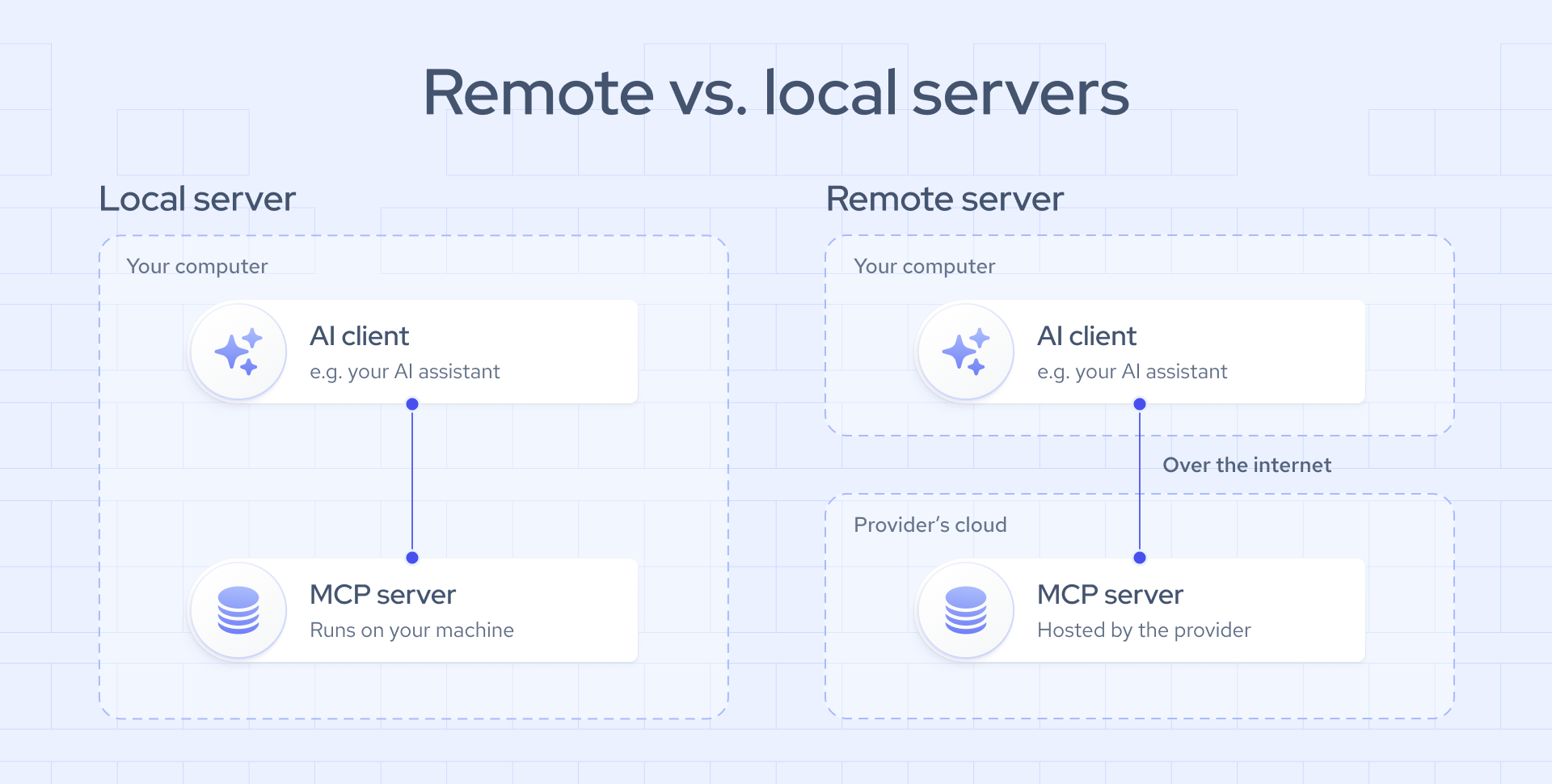
A business data MCP for AI server can run in one of two places.
- Local server: you install the server software on your own computer, and it runs there whenever your AI client is open. You handle setup, updates, and any software it depends on.
- Remote server: the provider runs the server on its own infrastructure, and your AI client connects to it through a web address. There is nothing to install – you add the address to your client and sign in.
Most B2B data MCP providers now offer remote servers. Everyone connects to the same up-to-date version, and the provider handles maintenance and fixes. A local server mainly makes sense when a team needs to keep the server inside its own environment.
Some providers offer both options. For example, Bright Data can run as a fully managed remote server or as a self-hosted local version. For running several agents at once, it recommends the remote option, since it needs no local installation.
2. Authentication: OAuth vs. API keys
B2B MCP for AI servers check who is connecting in one of two ways:
- OAuth: you sign in with your provider account in a browser, and the AI client gets access without ever seeing your API key.
- API key: you copy a key or token and paste it into the client’s configuration file.
The difference matters most for security. An API key pasted into a config file sits there as plain text. It can end up in a shared code repository, a screenshot, or a teammate’s setup, and anyone who has it can spend your credits. Removing access usually means replacing the key everywhere it is used.
OAuth avoids these risks. There is no key to copy, store, or leak, because access is tied to a personal sign-in. Each person signs in with their own account, and access can be removed for one user without affecting the rest of the team.
API keys still have a place in scripts and backend jobs where a browser sign-in is impractical. For agents used by people in AI clients, OAuth is the safer default.
Coresignal’s B2B MCP for AI v2 uses OAuth 2.1 sign-in through the Coresignal dashboard. The server checks a signed token on every request and fetches the team’s API key only when it is needed, so the key is never stored on the server.
3. Natural-language tools vs. direct tool calls
This design choice affects agent accuracy more than any other:
- Direct tool calls: the server exposes many narrow tools that mirror API endpoints, such as search, enrich, or fetch. The agent picks the tool and builds every filter itself.
- Natural-language tools: the agent describes what it needs in plain language, and the server builds the query.
Direct tools give developers more control. Natural-language tools reduce agent errors and token use on complex filters, which is where the query-syntax problem described above appears. Coresignal MCP takes the natural-language route. The server builds the query, explains how it searched and what the results include, and may ask follow-up questions to refine the request.
4. Credits, costs, and large result handling
Most B2B data MCP servers draw from the same credit balance or subscription as the provider’s API, so every agent call has a real cost. An agent can trigger dozens of calls in one session, so cost visibility is a practical requirement.
Look for three cost-control patterns:
- Cost reporting for every call
- A confirmation step before expensive pulls
- Free discovery or preview tools
Coresignal MCP shows the exact credits used in each response and pauses before large retrievals to confirm the record count and estimated credit cost.
Large results create a second problem: thousands of records returned inline flood the conversation and fill the model’s context window. Providers handle this in two ways:
- File delivery: Coresignal returns a preview inline and delivers complete pulls as a file link, so large pulls do not overwhelm the conversation.
- Tool selection: Bright Data lets you load only the tool groups you need, which reduces context size.
What to look for in a B2B data MCP server
Use this checklist to evaluate a server before you connect it to an agent.
- Data focus. Match the server to the workflow: company, employee, jobs, funding, or web data. The quality and coverage of business data MCP for AI depend on the provider’s underlying dataset, not on the MCP layer itself.
- Tool coverage. An MCP server may expose only part of a provider’s API. Check which data types, search options, and enrichment tools are available through MCP.
- Query accuracy. Test whether the server turns your real requests into the right filters. Servers that explain how they searched make mistakes easier to catch.
- Data source: API or static dataset. Ask whether the server queries regularly updated data or a fixed snapshot. Agents that track hiring or leadership changes need current records.
- Pricing and cost transparency. Check how calls are billed, whether each response shows its cost, and which tools are free.
- Result handling and export. Results shown in chat work for small lookups. For larger tasks, check whether the server can deliver results as a downloadable file.
- Result accuracy. Run a sample of companies or profiles you know well and compare the output with what you know is true.
- Official, secure access. Prefer servers maintained by the data provider over third-party wrappers, and confirm how credentials are handled.
- Client compatibility. Confirm the server works with the clients your team uses, such as Claude, ChatGPT, Cursor, or Codex, and with your own agent framework.
Best B2B MCP servers
The servers below are official, provider-maintained MCP servers that give agents access to B2B data. Each was reviewed against its public documentation as of October 2026.
Coresignal
Best for: AI agents and products that need complete company, employee, and jobs records in one tool call, without merging sources.
Coresignal MCP v2 gives agents multi-source B2B data on companies, employees, and jobs. Records from multiple public sources are combined into one clean record per entity. The data includes historical signals, such as headcount growth and leadership arrivals and departures, which research and due diligence workflows depend on.
- Data focus: multi-source company, employee, jobs data, and social posts, including historical data.
- Authentication: OAuth 2.1 sign-in through the Coresignal self-service platform. The server checks a signed token on every request and never stores the team’s API key.
- Field depth: 500+ data fields per company, 300+ per employee, and 80+ per job posting, including recruiter details.
- Costs: a natural-language search costs 20 credits, full record pulls cost 1-20 credits per record, and field discovery and file reading are free.
- Limitation: file downloads depend on each AI tool’s permissions, so some clients need downloads enabled first.
Crustdata
Best for: sales, recruiting, and investment teams that script agent workflows or monitor changes.
- Data focus: companies, people, jobs, social posts, and web content.
- Authentication: sign-in with a Crustdata account, or an API key passed as a bearer token for programmatic setups.
- Field depth: 1B+ people profiles with 60+ filters, 60M+ company profiles with 95+ filters, and 30+ data points per job listing.
- Costs: vary by request and plan.
- Limitation: features are split across two servers, so check which one supports your workflow.
Explorium
Best for: teams building prospecting, account research, and outbound or inbound email agents, with a choice between no-code chat and full tool control.
- Data focus: company and contact data.
- Authentication: OAuth sign-in for Vibe Prospecting, and an API key for AgentSource MCP.
- Authentication: OAuth sign-in for Vibe Prospecting, and an API key for AgentSource MCP.
- Field depth: 90M+ geospatial datapoints.
- Costs: Generate\ 1 Credit, Enrichments\ 1-5 Credits, Events\ 1 Credit.
- Limitation: AgentSource has ordering rules. Agents must call autocomplete before certain filters and get business IDs before enrichment.
Crunchbase
Best for: investors, analysts, and sales teams that research private companies, funding, and investors, and want both plain-language and exact searches in one server.
- Data focus: company profiles, funding rounds, investors, acquisitions, people, and predictions.
- Authentication: OAuth sign-in with a Crunchbase account.
- Field depth: 790 data fields per company and 39 billion live private market signals.
- Costs: data retrieval uses tokens from the account’s allowance, which varies by plan.
- Limitation: the data centers on private markets, so employee-level and jobs workflows need another source.
ZoomInfo
Best for: enterprise teams that need SSO, account-level permissions, and native connectors in major AI apps.
- Data focus: company, contact, and technographic data.
- Authentication: sign-in with ZoomInfo credentials or company SSO, connected through standard OAuth.
- Field depth: company profiles with firmographics, technographics, funding, and business signals, and contact profiles with verified business emails, direct dials, and employment history
- Costs: search and lookup tools are free, enrichment uses bulk data credits, and research tools use AI credits.
- Limitation: the server works only with bulk data credits, not recurring monthly credits, and returns only the data your ZoomInfo package already includes.
Final thoughts
The right B2B data MCP server depends on what your agent does and how much of the query work you want the server to handle. Direct tools suit developers who want to control every filter. Natural-language tools suit agents that need accurate results from plain requests without learning a provider’s query syntax. Whichever you choose, check cost reporting, spend confirmation, and file delivery before your agent runs at scale.
If your agent needs complete company, employee, and jobs records in one call, Coresignal MCP connects multi-source data to Claude, Cursor, Codex, and other MCP clients through one remote endpoint. Create a Coresignal account and connect it in a few steps.