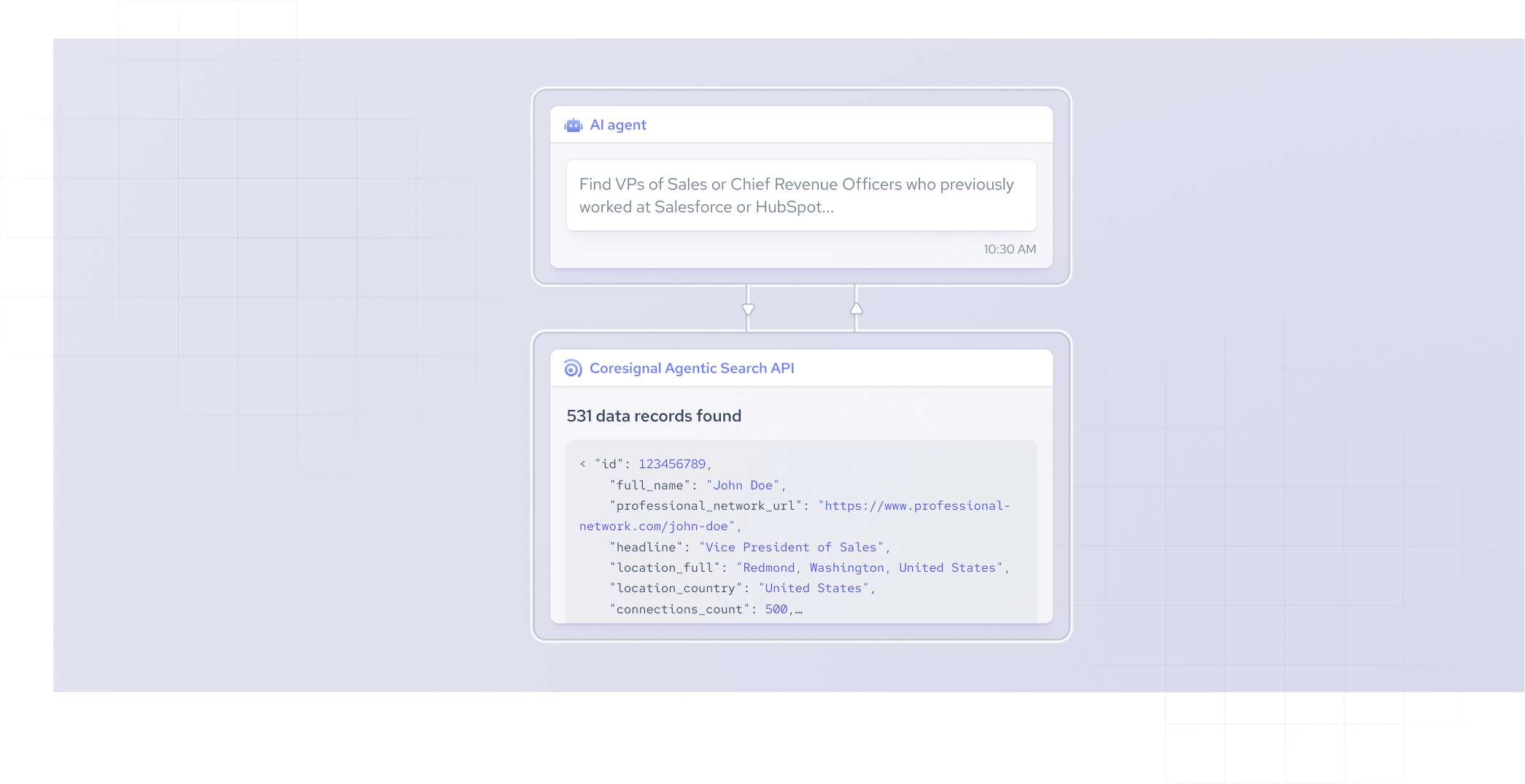




AI agents need access to external, real-time data, whether they're researching companies, qualifying leads, or powering an automated workflow. Agentic search makes this possible: instead of returning a static list of matches, it interprets your goal, pulls from the right external sources, and hands back structured, ready-to-use results.
In this article I will cover how agentic search works, how it differs from other retrieval methods, and what to look for when evaluating agentic search APIs and data providers.
What is agentic search?
Agentic search uses AI agents to autonomously understand, interpret, and pursue a goal, not just match keywords. Instead of relying on a single, fixed query, an agentic system breaks down the goal into steps. It searches across multiple external data sources, refines its approach as it learns, and can take further action based on new findings.
This approach is different from traditional keyword search or database lookups, which only return static results for a single input. Agentic search is often used in AI-powered research tools, recruiting platforms, and product features that need to work with live, external data instead of a fixed internal index.
How does agentic search work?
Agentic search operates through a defined, step-by-step process:
- The system interprets your intent, focusing on your goal instead of simply processing your exact words.
- Next, it identifies the key entities and filters, such as company size, job title, or location, to ensure the search targets only what is relevant.
- It then selects the most appropriate data sources to query, based on the entities and filters identified.
- The system executes the search in real time, running the query against the selected sources.
- Finally, it returns structured, actionable results, eliminating the need for manual sorting or interpretation.
How can agentic search be integrated into an AI agent?
Let me explain in more detail how does agentic search fit into an AI agent architecture. For example, Coresignal’s Agentic Search translates your request into Elasticsearch DSL, runs it on the right dataset, and delivers results you can use immediately. It offers two endpoints: /fast and /reasoning. I will explain the difference between them later.
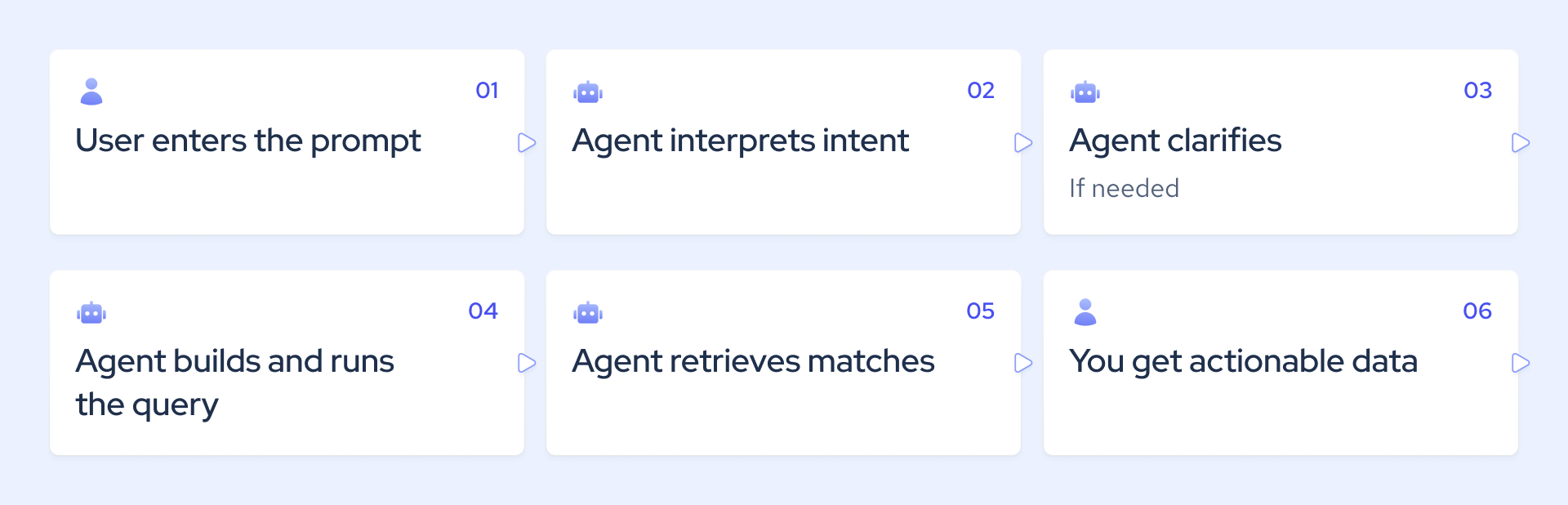
Once agentic search returns structured, normalized data, that output becomes the input for whatever your agent does next, whether that's enrichment, scoring, storage, synthesis, or another automated action further down the pipeline. This makes the integration a fit for custom AI pipelines, agent loops that run searches repeatedly, search features built into your product, or workflow automation at scale. And if you need more control, the generated Elasticsearch DSL isn't a black box, you can inspect or modify it directly when you need finer transparency over how a query executes.
What is an agentic search API?
An agentic search API enables AI systems to search data using natural language, not just fixed query parameters. You describe what you need in plain language. The API translates your request into a structured query and delivers ready-to-use, structured records for your workflow. Unlike traditional search APIs, which require exact query formats and return static results, agentic search adapts to your intent and streamlines integration.
When should you use Coresignal’s /fast or /reasoning endpoint?
Coresignal's Agentic Search API replaces traditional query complexity with plain-language prompts for B2B data retrieval. Instead of building Elasticsearch queries by hand, you describe the data you need in plain language and get structured B2B data back in your own app or dashboard.
The API offers two endpoints built for different types of requests: /fast and /reasoning. Both accept a natural-language prompt and return either structured B2B data or a generated Elasticsearch DSL query, but the architecture behind them differs in several important ways.
- The /fast endpoint is optimized for speed and cost. It accepts a natural-language prompt and an entity type (company, employee, or job), translates the prompt using a simplified schema, and returns results within seconds.
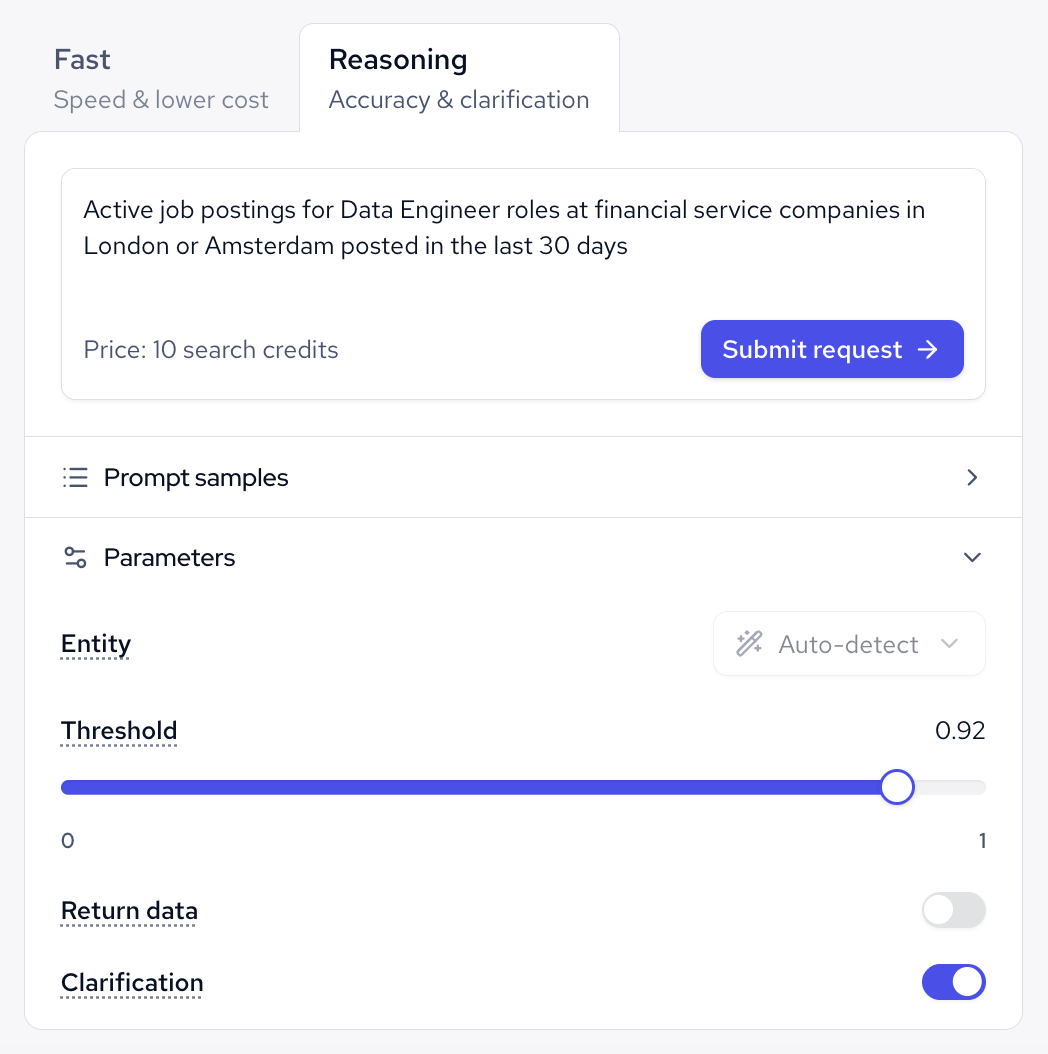
- /reasoning is designed to deliver accurate results, even for complex queries. Instead of specifying the entity upfront, you can write a detailed prompt, and the system will infer the entity automatically. The endpoint draws on the complete data schema and uses a multi-agent approach to generate more precise query translations. If your prompt is unclear, you can enable the clarification parameter. This allows the API to ask follow-up questions, ensuring your search is refined before it runs.
What makes a B2B dataset AI-ready?
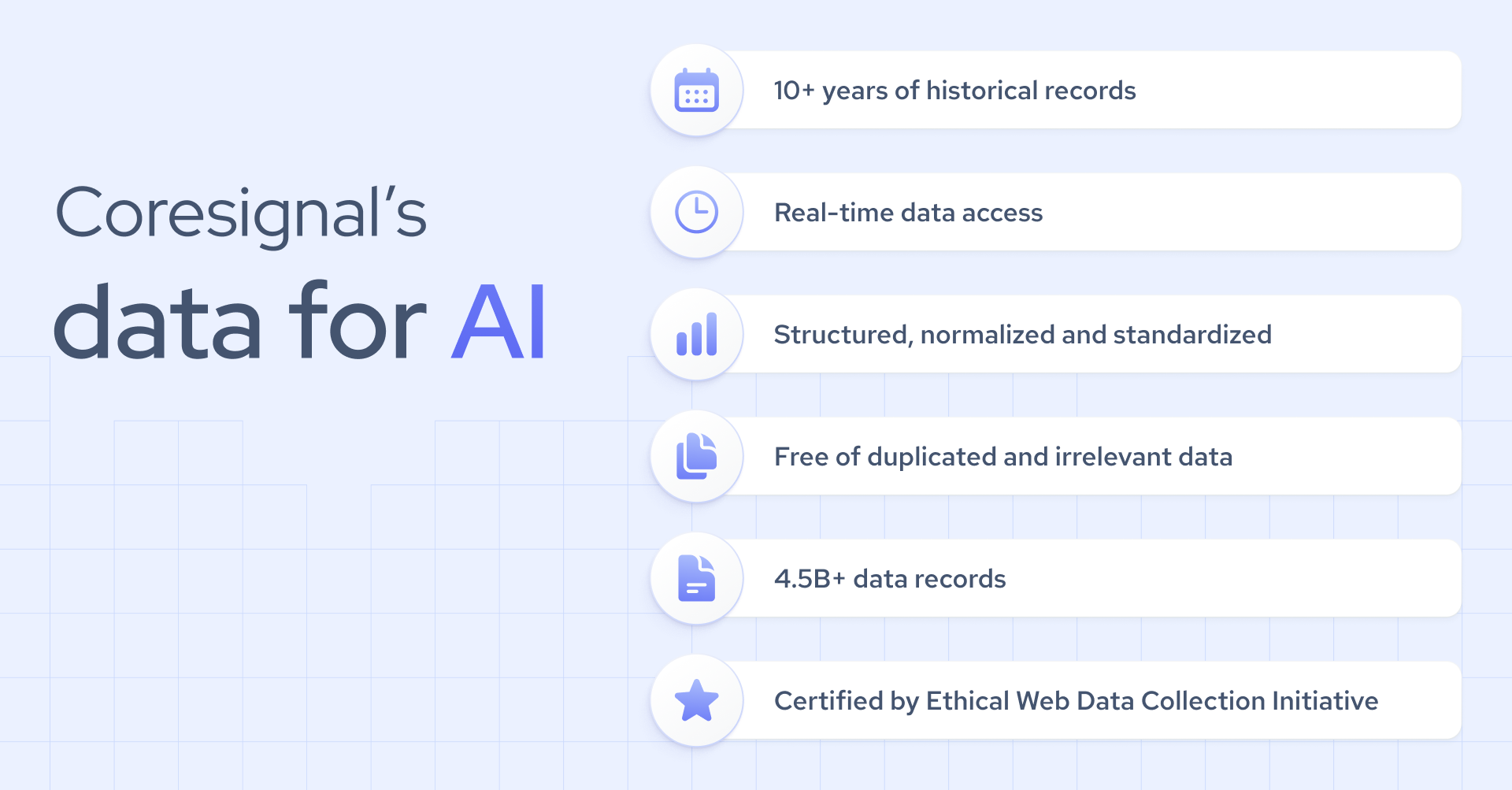
AI ready data needs to be structured, consistent, normalized, deduplicated, fresh, with historical depth, machine-readable, and include metadata. Based on my experience, here are the key details that make data AI-ready:
- Structured schemas and consistent fields. When each record uses the same format, and fields appear in every entry, you avoid unnecessary cleanup. This way, AI systems can process your data quickly and with precision.
- Normalization, deduplication, and entity resolution. Standardizing company names, job titles, and locations, removing duplicates, and accurately matching entities across sources ensures your dataset reflects a single, reliable version of reality. Without these steps, you risk working with conflicting or misleading information.
- Freshness, historical depth, and coverage. Your data should be up to date to capture current realities, have enough historical depth to reveal meaningful trends, and offer broad enough coverage to address the specific market or segment you care about.
- Machine-readable formats and metadata. Delivering data in formats such as JSON, paired with comprehensive metadata, allows for direct ingestion by APIs and data pipelines. This removes the need for manual reformatting and accelerates your workflow.
Why do AI agents need structured, real-time data?
AI agents rely on real-time data to operate autonomously and make accurate decisions. Outdated or incomplete data leads directly to poor outcomes.
Let’s take an AI recruiting agent as an example. If it accesses a candidate's work history from a source that removes past roles after a short period, it will assess candidates based on incomplete information and produce inaccurate rankings.
So in short, structured, real-time data determines the level of trust you can place in an agent's autonomous actions. With up-to-date information, agents can qualify leads as soon as a company posts a new job, identify compliance risks before deals progress, and filter out bot profiles before they compromise your database.
However, I want to emphasize that different use cases call for different refresh speeds. The right freshness is the one that matches how fast the underlying reality changes and how quickly the agent needs to act on it.
How is agentic search different from traditional search?
The difference between traditional and agentic search is that traditional search matches keywords and delivers documents for users to review, while agentic search acts as an autonomous assistant, providing structured data that can be acted on right away.
For example, if you search for "software engineers at fintech startups," a traditional search gives you a list of links or profiles that you still have to open, read, and check for relevance. Agentic search starts with your goal instead of just keywords. It uses details like company size, location, and hiring stage to build a structured query.
I’ve compared these two types of search below to make them easier to understand.
How does semantic search support agentic search?
Semantic search goes beyond matching exact words. It interprets the intent and meaning behind a query. With Coresignal’s Agentic Search API, semantic title search automatically expands job title queries to include related roles. For example, searching for "Software Engineer" returns not only exact matches, but also relevant titles with similar responsibilities. This approach ensures you access a wider range of meaningful results from a single query.
You can also adjust a Threshold parameter to set the minimum confidence score for including synonyms. A higher threshold means stricter matching and higher precision, while a lower threshold broadens the results and increases recall. This flexibility lets you fine-tune the search expansion to fit your specific needs.
In short, semantic search answers "what does this term mean," while agentic search answers "what should I search for, how should I refine it, and what do I do with the answer.”
What kinds of B2B data power AI agents?
Firstly, I want to mention that the depth and accuracy of the data for AI agents vary by provider, since coverage depends on how many sources are aggregated and how the underlying data is collected and maintained. At Coresignal, we have 4.5B+ company, employee, and jobs records. They are accessible as datasets or through real-time APIs in AI-readable data formats such as JSONL and Parquet.
Coresignal’s company data covers firmographics such as industry, size, and location, along with signals like headcount changes and technologies in use. Employee data includes career history, current role, and skills, while job posting data captures hiring activity such as open roles, seniority level, and how long a position has been listed.
Here you can see a snippet of the firmographic dataset:
"company_name": "Example Company",
"company_legal_name": "Example Company, Inc.",
"company_name_alias": [
        "example-company.com",
        "Example Company"
        "Example Company, Inc. "
    ]
"company_logo_url": "https://www.professional-network.com/logo-url",
"is_b2b": 1,
"industry": "Software Development",
"founded_year": "2000",
Also, what I can definitely confirm from practice is that combining current records with historical data adds a dimension an agent can't get from a snapshot alone: a company's headcount today matters less than whether it grew 40% in the past year, and a candidate's current title matters less than the career trajectory that got them there.
What are the main agentic search use cases?
The table below outlines the most common agentic search use cases and explains how structured data can be integrated into automated sales, lead generation, and HR workflows.
How do you evaluate an agentic search API?
When assessing an agentic search API, focus on data quality, search performance, integration capabilities, pricing, and control. Below, I break down each of these critical areas.
What are the limitations of agentic search?
Agentic search introduces important tradeoffs in accuracy, cost, and control. I've seen these limitations come up often when working with clients, so I strongly suggest that teams think carefully about them before adding agentic search to their production workflows.
- Misinterpreted intent. If a request is vague or ambiguous, an agent may interpret it differently than intended, which can lead the search process off course from the outset.
- Queries that are too broad or too narrow. These can produce results that are either overwhelming in volume or lacking in relevance. In both cases, additional refinement is needed before the output becomes actionable.
- Higher latency on complex searches. These queries require more processing time, which can delay the delivery of results.
- Added API costs. Each search contributes to overall API costs, particularly when agents run multiple queries to refine their outputs. This can quickly increase operational expenses if not monitored closely.
- Data-source coverage gaps. Agents are limited by the scope of their data sources. Any gaps in a provider’s coverage become blind spots, which may result in missed insights or incomplete results.
- Need for human validation on high-risk decisions. Actions like approving a large transaction or finalizing a hiring recommendation still require a person to sign off, not full autonomy.
- Runaway query loops. Because agents can act repeatedly and independently, teams need guardrails to prevent redundant or looping searches.
- Limited observability. Without visibility into what an agent searched for and why, problems can compound before anyone catches them.
How do you choose the best data provider for AI agents?
There is no universal best data provider for AI agents. The right choice depends on your specific use case. However, several key criteria can help you evaluate providers and make an informed decision.
- Data freshness. Consider how up-to-date the data is and how frequently it is refreshed. Timely data ensures your AI agents work with relevant information.
- Coverage. Evaluate how comprehensive the dataset is across companies, employees, and jobs. Broader coverage can unlock more robust insights.
- Historical depth. Look for providers that offer data going back several years, not just a current snapshot. This enables trend analysis and deeper context.
- Source diversity. Datasets aggregated from multiple sources tend to be more reliable and less prone to gaps than those relying on a single origin.
- Normalization. Cleaned and standardized records are easier to work with and reduce the risk of errors, while raw, inconsistent formats can slow down your workflow.
- Deduplication and entity resolution. Providers that merge duplicate profiles and resolve entities save you time and prevent confusion down the line.
- Schema consistency. Consistent data structures across endpoints or datasets make it easier to scale and maintain your solutions.
- Access options. Look for providers that offer real-time APIs, bulk datasets, and agent-oriented access for natural-language queries, such as a company search MCP. Flexible access supports a wider range of use cases.
- Scalability. Make sure the provider can handle production-level volumes, not just small-scale tests. This ensures your solution can grow with your needs.
- Ethical sourcing. Confirm that the data was collected ethically and that its permitted use matches your intended application.
You can also compare data providers for AI agents based on coverage, AI-native features, data freshness, quality, integrations, delivery options, and more.