

Fresh and historical employee, company, and jobs data is now even more accessible. No-code automation platform Zapier and AI-powered data enrichment platform Clay now both support a Coresignal integration, meaning users on either platform can connect to Coresignal data without writing a single line of code.
For sales, recruiting, and market intelligence teams, this removes one of the most common friction points in data workflows: the gap between having access to high-quality B2B data and actually getting it into the tools where decisions are made. Whether you are enriching a CRM, building a lead list, sourcing candidates, or monitoring company signals, Coresignal's data can now flow directly into your existing Zapier automations or Clay tables – fresh, structured, and ready to act on.
What does it mean for Coresignal users?
The Coresignal Zapier integration and Coresignal Clay integration provide an easier way to connect employee, company, and jobs data with the tools most teams already use. Essentially, Coresignal users gain a new data delivery method for a service they are already paying for. Instead of pulling data manually or building a custom integration, they can now route it directly into the tools their teams already use, reducing workflow overhead and time to value. Specifically:
- Recruiting and HR teams can pull fresh employee and company data into Zapier workflows automatically.
- Sales and GTM teams can enrich leads as they enter a CRM and build prospect lists in Clay directly from Coresignal data.
- Market intelligence and research teams can set up automated monitoring of company signals and pipe that data into spreadsheets, dashboards, or notification workflows in Zapier.
- Non-technical users gain access to Coresignal data through Zapier and Clay's no-code and low-code environments, without needing engineering support to build a direct API connection.
Coresignal Zapier integration

This Zapier integration brings Coresignal employee, company, and jobs data into 9000+ Zapier apps without coding. The data can be used to both enrich existing records and find new records matching a set of filters. However, Coresignal provides only Action (Search) steps, not Triggers. The integration cannot start a Zap automatically on its own – it must be paired with a trigger from another app.
How does it work
The integration allows seven actions built around three core patterns:
- Search (Find): query across the full dataset using guided filters or a raw query, and get back up to 20 matching records at a time. Results can be paged through and looped over in subsequent steps.
- Enrich (Find by ID): retrieve a single, complete profile using a Coresignal ID, profile URL, or company domain. Output can be mapped field by field or returned as JSON.
- AI Prompt search: describe what you are looking for in plain English and let the integration translate it into a structured query – useful for users who do not want to configure filters manually.
Across all search actions, users can choose between guided filter fields (name, location, industry, seniority, date ranges, and more) or a raw Elasticsearch query for full control. Results can be returned as full previews ready to map into the next step, or as IDs only, designed to feed a follow-up enrichment step at scale.
Use cases and workflows
Connecting Coresignal to Zapier means your team can act on fresh B2B data inside the tools they already use. Here are the most impactful ways to put it to work:
- Keep your CRM contacts complete and current. Every new lead that enters your CRM can leave with a full profile attached. Job title, seniority, department, company size, industry, location, and funding stage – pulled automatically from Coresignal the moment a contact is created or updated. Your team spends less time on manual research and more time on conversations that matter.
- Turn any company domain into actionable intelligence. A website or email domain is all it takes. The moment a new signup, deal, or inbound appears, Coresignal can return a complete company profile – employee count, industry, headquarters, technologies in use, and latest funding round – pushed straight into your CRM or data warehouse. What used to take a whole session now happens in seconds.
- Build prospect lists that refresh themselves. Define your target audience once, by industry, location, headcount, seniority, or any combination, and let Coresignal do the rest on a schedule. Lists populate automatically, stay current, and feed directly into Google Sheets, Airtable, or your CRM. No more stale spreadsheets or manual list-pulling.
- Find the right people without writing a single filter. Not sure how to configure a search? Just describe who you are looking for in plain English and the integration handles the rest. It is the fastest way for non-technical users to get targeted, structured data out of Coresignal without touching a single dropdown.
You can read more about it in our documentation.
Coresignal Clay integration
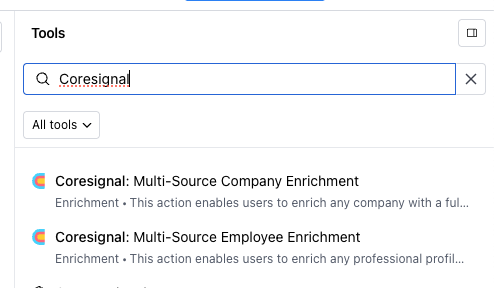
This integration brings Coresignal's multi-source company and employee data directly into Clay tables through an HTTP API enrichment, meaning a list of domains or identifiers can be turned into full, structured company or employee profiles in a matter of minutes.
- For sales and GTM teams, this means prospect research that previously took hours of manual work – finding company size, industry, headcount, funding stage, technologies used, and headquarters – can be automated at scale inside the same environment where sequences and outreach are built.
- For recruiting teams, employee enrichment through the same pattern gives structured profile data without manual lookup.
- For market intelligence and data teams, it means Coresignal's depth of firmographic, technographic, and hiring signal data becomes available as a structured, queryable layer inside Clay's flexible table format, ready to feed into any downstream step or export.
The integration works with any column of company domains or Coresignal identifiers, returns the full range of Coresignal's company or employee fields, and gives users control over exactly which fields are written back, keeping tables clean and within Clay's processing limits. It is particularly well suited for teams that are already working in Clay and want to add a high-quality, frequently updated B2B data source without switching tools or building a separate pipeline.
How does it work
Clay Coresignal integration setup follows four straightforward steps:
- Create a table
- Add an enrichment column
- Choose which fields to return
- Run the enrichment
The result is a fully enriched table where each row contains structured, fresh B2B data from Coresignal alongside whatever other enrichment sources or columns your workflow uses. We cover more details in our documentation.
Summary
Whether you are automating CRM enrichment in Zapier or building a prospect table in Clay, the setup takes minutes and the output is immediate. A domain becomes a full company profile. A contact becomes an enriched lead.
The integrations are built for teams that want to spend less time moving data and more time acting on it. No pipelines to maintain, no manual exports, no engineering tickets. Just fresh, structured B2B data flowing into the workflows your team already relies on.
If you are an existing Coresignal customer, this is a new way to get more out of data you are already paying for. If you are new to Coresignal, Zapier and Clay are now the fastest way to see what the data can do – without any technical setup standing between you and your first enriched record.
Explore the Coresignal integration on Zapier and Clay and see how far fresh B2B data can take your workflows.