



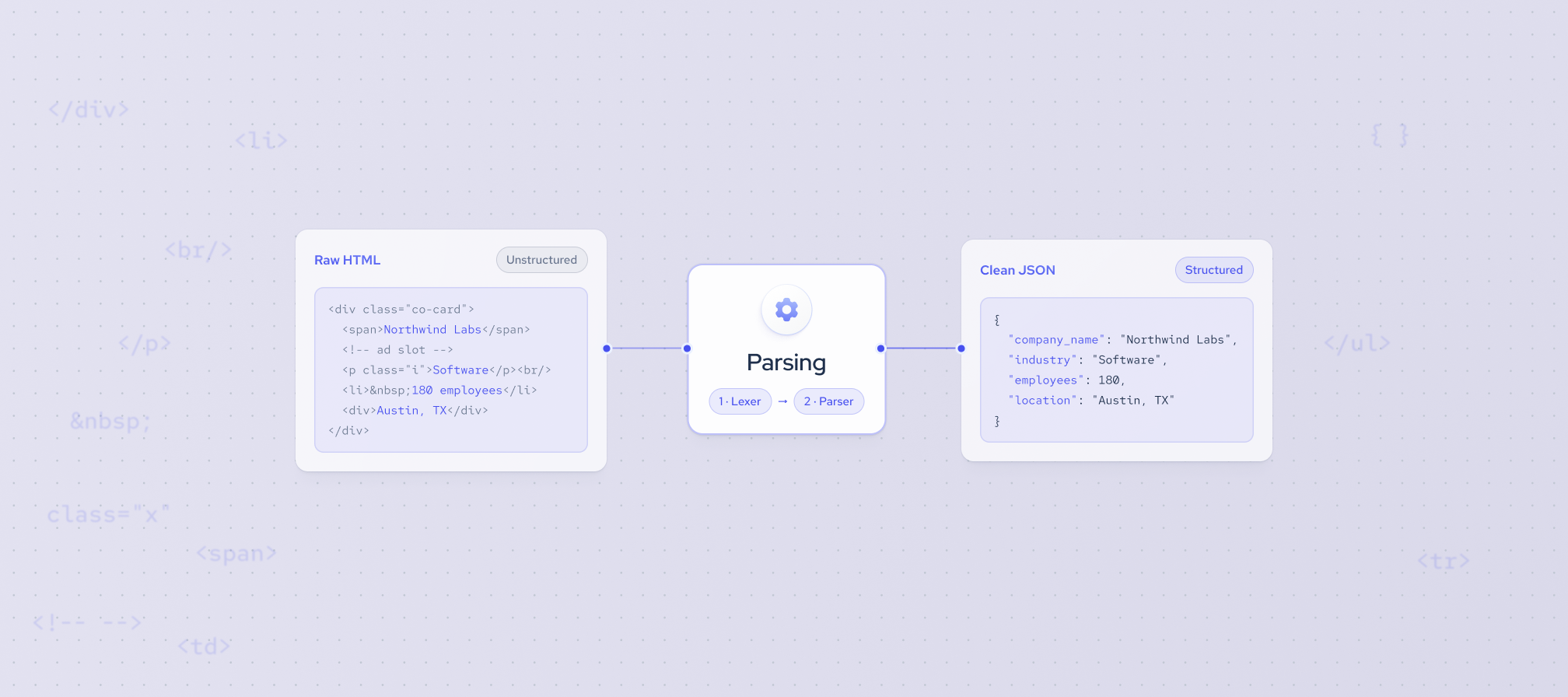
Data parsing is the process of converting raw, unstructured data into a structured format that software and people can use. A data parser reads input such as HTML, plain text, or log files, identifies the meaningful pieces, and organizes them into consistent fields, typically as JSON or CSV.
The HTML is built for a browser to display. The JSON is built for a database, a spreadsheet, or a model to use. Parsing is the step in between.
Below, we'll cover what a data parser is, how parsing works, and when it makes more sense to buy data that's already parsed.
What is a data parser?
A data parser is a tool that reads data in one format and outputs it in a structured one. Feed it a web page, a log file, or a block of text, and it returns clean fields you can store, search, or analyze.
Most parsers work in two stages.
1. Lexical analysis: breaking input into tokens
The first stage is handled by a lexer, also called a tokenizer. It scans the raw characters and groups them into tokens, the smallest meaningful units: keywords, names, numbers, and symbols. It drops anything without meaning, like extra whitespace and comments. In the mathematical expression (x + 4) * 5, the lexer sees an opening tag, a text value, and a closing tag. In this case, the lexer produces seven tokens: (, x, +, 4, ), *, and 5.
2. Syntax analysis: building the structure
The second stage is the parsing itself. It checks the tokens against the rules of the format, called its grammar, and arranges them into a parse tree that shows how the pieces relate. For (x + 4) * 5, the tree puts * at the root, with x + 4 on one branch and 5 on the other. The parentheses don't appear in the tree. That’s why + sign sits lower and is evaluated first. Brackets, braces, and tags don't survive as data; they become the shape of the tree.
.webp)
How to parse data
Whatever the source, parsing data follows the same five steps.
- Input format identification. Is it JSON, HTML, CSV, a log file, or free text? Structured formats are easy, while unstructured text takes more work.
- Choosing a parsing method. Use a built-in library for standard formats, regex for predictable text patterns, and an AI model only for messy, varied layouts.
- Extracting the fields you need. Decide on your output schema first (field names and types), then pull only those values.
- Cleaning and validating. Convert types, normalize dates and units, and flag missing or malformed values instead of silently dropping them.
- Store the output. Save it as JSON, CSV, or rows in a database, ready for analysis or import.
Data parsing use cases
Parsing shows up anywhere raw data has to become something a team can analyze, search, or act on. Here are four most common examples:
1. Investment analysis
Investors track signals like headcount growth, new job postings, and leadership changes to evaluate companies and start-ups. Parsing turns company pages and job listings into time-series fields (employee count by month, open roles by department) that can feed screening models.
2. Resume and CV parsing
Recruiting platforms receive resumes in PDF, Word, and plain text, each laid out differently. A resume parser extracts names, job titles, employers, dates, and skills into a standard profile, so candidates can be searched and matched to roles.
3. Lead enrichment
For the sales teams, parsed company data fills in industry, size, location, and tech stack, which helps with lead scoring and routing in the CRM. This gives them a solid starting point beyond the company name or domain.
4. AI training data
AI models need clean, consistent input. Parsing strips markup, normalizes formats, and labels fields so web data can be used for training, fine-tuning, or retrieval without carrying noise into the model.
Common data parsing challenges
Handling data comes with its challenges, and data parsing is no exception. Below, we discuss three common data-parsing challenges and how to address them.
1. Errors and inconsistencies
Real-world data is rarely clean. Fields go missing, formats shift between sources, and one malformed record can break a pipeline. A robust parser checks every value against the expected schema, logs failures, and flags issues instead of silently dropping them. That way, bad inputs get reviewed rather than corrupting downstream analysis.
2. Handling large amounts of data
Parsing a few pages is easy, but parsing large amounts of data is an engineering problem. Memory limits, slow processing, and growing storage costs all show up at scale. To simplify the process, stream or batch inputs instead of loading everything at once, and run the work in parallel. Monitor throughput and error rates so one failing source doesn't stall the job.
3. Changing source structures
Websites redesign pages and rename HTML classes without notice, causing parsers built on fixed selectors to break silently. Output keeps flowing, but fields come back empty or wrong. To avoid this issue, use resilient selectors, run automated checks that compare output against expected patterns, and alert on sudden drops in field coverage.
Building vs buying a data parser
Once you know you need parsed data, the next question is whether to build the parser yourself or buy pre-parsed data. There are three realistic options.
Build your own parser when your input is niche, the data is internal or sensitive, and you have engineers who can maintain the parser long term. If you choose this way, it’s recommended to budget for upkeep, not just the first version.
When you already collect the raw data and just need a faster, more reliable way to structure it, consider buying a tool.
Buy pre-parsed data when the data you need is public web data, such as company profiles, job postings, or professional profiles, and parsing it isn't your core business. You skip both scraping and parsing and start directly with structured records.
Coresignal and data parsing
We parse public web data and deliver it in structured formats, such as JSON (JavaScript Object Notation) and CSV. Parsing removes unnecessary HTML tags and organizes each record into consistent data fields, so it's ready for analysis or direct import into your systems. Our multi-source public web data combines information from multiple public sources into a single record, giving you a complete view of each company, professional, or job posting.
Ultimately, if your company works with data in any capacity, understanding data parsing will help you choose the right data parser for your business needs.


