


.jpg)
In the U.S. alone, hundreds of thousands of new companies are registered every month. Combine this number with the millions of already established enterprises, and you might find yourself overwhelmed by the massive amount of data that needs to be collected, sorted, mapped, and cleaned to extract any valuable insights.
Today, we wanted to share the best methods and sources for information about companies, their main types, and more.
Main company information types you can source
When doing a company search for competitive analysis or researching companies for sales, partnerships, investment, or recruiting, it's all about finding the right data. You can uncover insights based on various data, from growth signals to hiring trends and market positioning.
We gathered key categories of business data you can source to help you understand and evaluate your target companies more effectively.
Public vs Private company information
Public companies have better access to capital but are more regulated, while private companies have greater independence but limited access to funding. Private companies might go public when wanting to raise capital.
Public companies are corporations that sell ownership shares to the general public. Think about large corporations here - the list includes Apple, Microsoft, Walmart, or ExxonMobil. The management and strategy of these companies are assigned to a board of directors selected by the shareholders.
The shares to the public companies can be bought and sold on a stock exchange. Information about these companies is readily accessible to the public due to detailed financial and operational reports. Public companies have better access to capital through issuing corporate bonds in the public markets or selling new stock. On the other hand, they deal with stricter regulations from the government and shareholders.
Public companies are legally required to disclose operational and financial details, including quarterly and annual reports. However, the private companies are not obligated to do the same. Therefore, it makes it more difficult to find data from private companies.
Private companies are businesses owned by a single person or a small group of individuals – it can be anything between a mom-and-pops corner shop to a large private company such as McKinsey & Company. They can be family businesses or larger corporations. These companies can be structured as partnerships, limited liability companies (LLC), or corporations. Their shares are not traded on public stock exchanges.
Private companies are more flexible: decisions are made quickly, owners have greater control, and processes are less complex and less strictly regulated. They're focused on raising capital through loans, private investors, and profits. Private companies are required to have fewer regulations and financial disclosure requirements than public companies.
Although it leads to a lack of transparency, it can be difficult for the public to find accurate, detailed information about these companies. In addition, their growth can be restricted due to private sources limiting access to capital.
Top sources for information about companies
When looking for public company information, these are the three best sources:
- Company-provided information. Get data from company pages, social media channels, and their "About Us" sections, where annual reports are usually posted.
- Official filings from primary sources. In the U.S., public companies are required by law to file detailed financial and business reports.
- Financial news websites and databases. For additional context and analysis from industry experts, check financial media and business information services. Visit financial news outlets like Bloomberg or The Wall Street Journal, or try business databases for detailed analysis.
For private company details, different tools can be utilized. The data is less complete and less standardized. Private companies aren't obliged to publicly expose their financials, unlike their public counterparts. Best sources are local registries, business databases, and third-party research:
- Free and publicly available sources, including news and press releases, job postings, social media, and company websites. All of these are great sources for information on private companies, their financial performance, or partnerships.
- Private company databases provide detailed data and are frequently subscription-based. They're usually available through academic or public libraries.
- Professional and social networks like LinkedIn provide information about hiring culture, employees, and company details.
- Company data providers like Coresignal that offer public web data collected from multiple sources, deduplicated, and integrated into easy-to-ingest datasets.
All of these sources help to build trusted company database and verify company information.
Top datasets for company information
When choosing the type of dataset that's right for you, it's essential to consider factors like the quality of data you're going to get, the provider's reputation and principles of ethics, as well as your budget, goal, and how much information you actually need for your questions to be answered.
Coresignal gives you access to full-scale AI-enriched company data from multiple sources for a thorough understanding of businesses. It offers three data processing levels for your specific needs: Base, Clean, or Multi-source.
- Base data brings fresh, scraped, structured, and easy-to-use data from one source.
- Clean data is gathered from a single source, deduplicated, and standardized.
- Multi-source company datasets provide well-structured, up-to-date insights on general information, finances, reviews, and other valuable data on business growth gathered from multiple sources.
The multi-source dataset is the most comprehensive option for getting a complete picture of the company's performance. This way, difficult-to-reach data becomes easily accessible and easier to work with.
Top data APIs for company data
Whether developing data-driven tools or gathering insights for CRM strategies, a reliable company data API can be a game-changer. APIs provide direct access to continuously updated business information - saving time and enabling smarter decisions for sales, investment, marketing, or product development.
Here is a full list of Coresignal APIs that can help you automate sourcing company data:
- Company enrichment API lets you get fresh data on specific companies.
- Base Company API gives you access to basic business data on millions of companies.
- Clean Company API is great for an improved version of a single-source company details. The data is cleaned and enriched, which supplies additional data fields.
- Multi-Source Company API offers precisely detailed business records with data that is cleaned and AI-enriched.
- Job Posting API will help you find new companies that are hiring for roles that are relevant to your business needs
Companies also use Coresignal's Employee API to track hiring trends or identify key decision-makers, while the Company API helps them gain firmographic insights on target firms.
How to find company information? Step-by-step guide
If you're curious to get company information easier, sign in to our self-service platform for free. There are multiple ways to access company data, including the AI Data Search tool and the Company API Playground. You might want to try these options to find the one that works best for you.
All of these tools will help you find company contact information, verify business information, and search business information that is available on multiple sources.

Register for a 14-day free trial
Access to millions of company, employee, and jobs records with ease
Step 1: Explore company data with AI Data Search
Coresignal's new AI Data Search simplifies access to B2B public web data by enabling users to search all our datasets in plain English. Instead of navigating technical schemas or configuring complex filters, you can now describe the data you're looking for, and receive tailored results. This business information lookup tool helps you to get the data you need without ever needing to talk with data engineers.
Whether you need company profiles, employee insights, or job posting data, the tool pulls from millions of records across Coresignal's multi-source databases. It's ideal for sales prospecting, recruitment, market research, and investment analysis, and it offers on-the-spot JSONL data downloads.
This tool reduces the need for technical support, speeds up access to insights, and empowers users to independently generate datasets that align with their specific business needs.
Step 2: Choose API playground
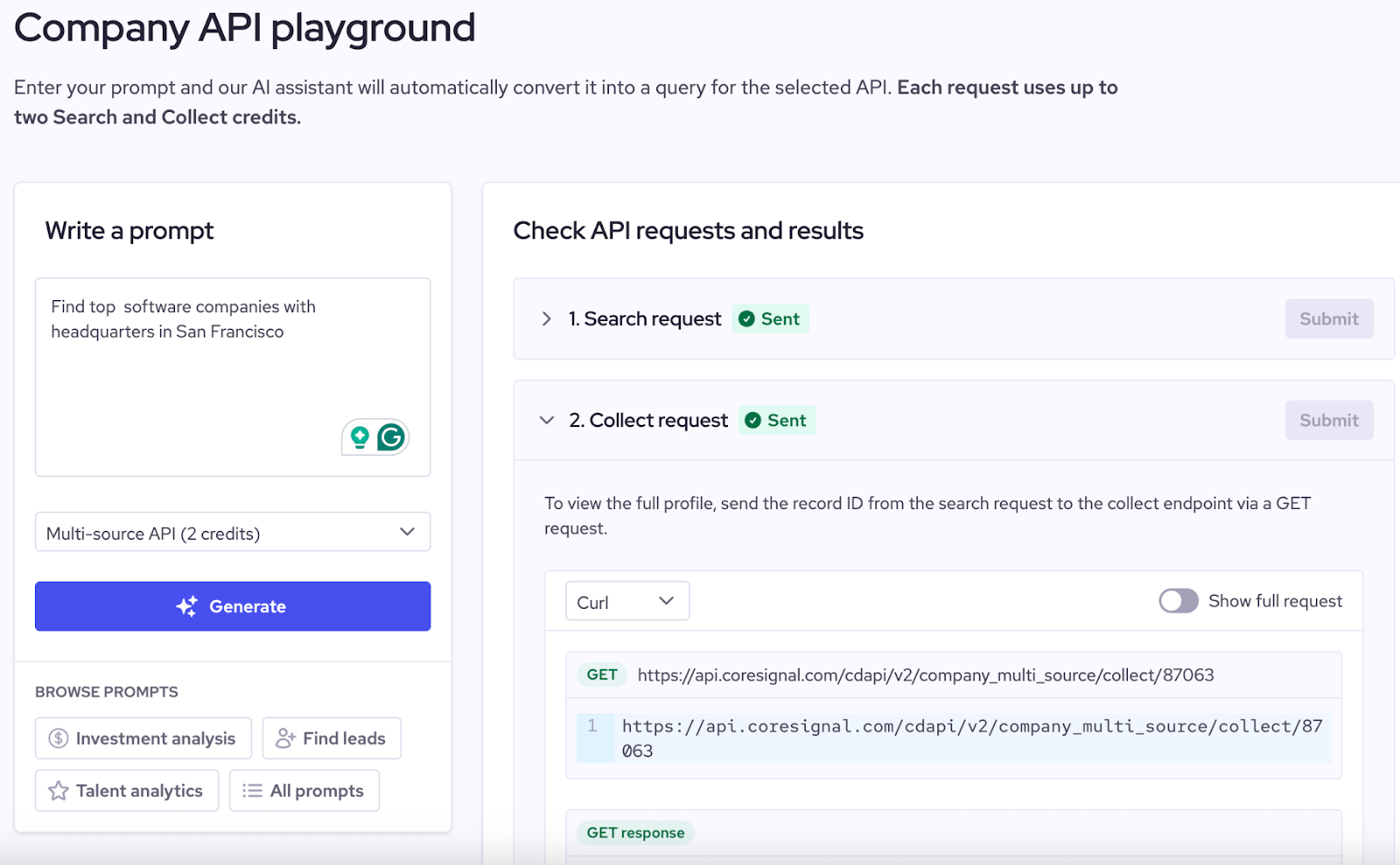
If you are interested in setting up and API for real-time data access, you might want to explore the Company API playground. It will help you to run a quick company information lookup, as each request will return full company profile. You can find our Company APIs on the sidebar on self-service.
Now, write a prompt to get the needed information. You can use this data dictionary to help you get as specific information as possible. Then, write a prompt to get the needed information, and check a sample record that can be found under the Collect request.
Keep in mind that the Multi-Source API uses 2 credits per search, and your results will include more data fields, while the Clean and Base APIs use 1 credit each.
How to automate company information sourcing?
To automate company information sourcing with Coresignal, start with the Company API and Company enrichment API, which provide structured, multi-source data on firmographics, growth signals, tech stack, and more. These APIs are built for scale and refresh millions of records monthly.
You can build efficient workflows by integrating Coresignal's data with tools like Zapier, Clay, or custom scripts. Here’s how to do it effectively:
- Choose the right data: Use multi-source company data, clean company data, or job posting data based on your goal. You will need to use different APIs for lead generation, investment insights, or market research.
- Retrieve data via API: Set up API calls to pull company profiles or enrich your existing records in real time.
- Automate workflows: Connect to CRMs, dashboards, or Slack using automation tools for alerts and lead scoring.
- Ensure fresh data: Make the most out of Coresignal’s continuously updated data to work with current and relevant information.
- Enrich with multiple sources: Combine company data with employee and job data for a more complete view.
- Monitor and refine: Track performance and optimize your triggers and filters as your needs evolve.
This setup ensures real-time, scalable sourcing that delivers actionable insights directly into your systems without manual effort.
Company profiles with context
Coresignal's multi-source company dataset provides comprehensive, up-to-date B2B data on millions of companies, integrating context from top business sources and AI-driven insights. This dataset will help you get information about a company, including general business information and finances, workforce, reviews, and changes related to its success and growth.
Relying on multiple sources lets companies enrich their data with greater detail and fill gaps in the data they already have.
The multi-source company data provides all the business information needed for analyzing and evaluating the companies you're interested in. In addition, we extract information about companies' products and analyze changes in key growth-related metrics.
The Multi-source dataset provides:
- 500+ data fields
- Multi-source data
- Analytical data fields
- Structured, normalized, deduplicated, and standardized data
- AI-enriched with additional data fields


